PB&J Studio Free PDF editor & DSC signer for Windows
NEWA free, all-round PDF tool for Windows. Sign one PDF in many places with your USB DSC token, pick pages from several PDFs into one, rearrange or split pages, fill, comment, redact and protect — offline, on your own PC. For everyone.
PB&J Studio 1.2.0
LATEST · FREEVersion 1.2.0 · Windows 10 / 11 (64-bit)
- Multi-Sign: sign one PDF at many places with a USB DSC token
- Multiple PDFs: pick pages from several files into one
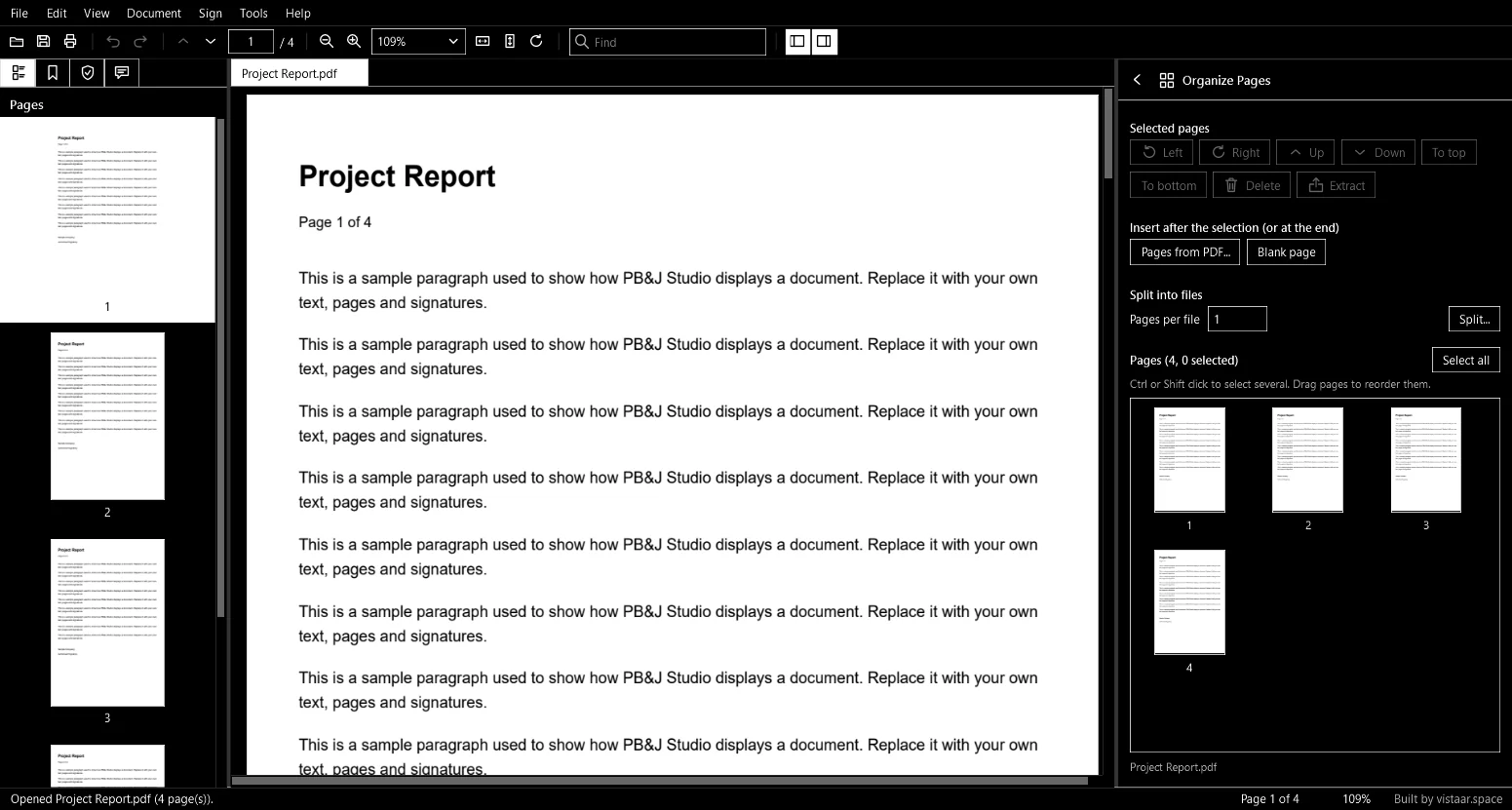
- Rearrange pages by drag and drop, rotate or delete them
- Extract or split: turn every page into its own PDF
- Fill forms, comment, edit, search and read aloud
- Redact (truly removes text) and protect with AES-256
- Works fully offline: no uploads, no account inside the app
Free with Google sign-in · 61.5 MB · no admin rights needed
Edge says the file “isn't commonly downloaded”? Click ⋯ → Keep. It's normal for new apps — see FAQ.
All versions
Need an older version? Pick it here.
- 1.2.0RECOMMENDED20 Nov 2026 · 61.5 MB
Multiple PDFs tool, To top / To bottom, sharper page rendering.
SHA-256 38c33ddda0c2e7d1…08fab314
- 1.1.116 Nov 2026 · 61.5 MB
Acrobat-style signature look; PDFs opened from Explorer share one window.
SHA-256 795f7490c623aecd…8658af85
- 1.1.015 Nov 2026 · 61.4 MB
Preferences (Ctrl+K), select and snapshot tools, quick actions, form highlight, Send to WhatsApp.
SHA-256 8949f98e0e021684…89933c29
- 1.0.015 Nov 2026 · 61.4 MB
First release: Multi-Sign with a USB DSC token and the core PDF tools.
SHA-256 73b57dddf1703686…79fc70a5
Latest SHA-256 (check with Get-FileHash): 38c33ddda0c2e7d1e4dec23d0f1147c38d4cf5f82cdd08b28504e1c608fab314
What is PB&J Studio, and why use it?
Paper, Binder & Jurat — everyday PDF jobs in one small app.
A Windows PDF toolkit. Multi-Sign puts your DSC signature at many places in one run; Multiple PDFs builds one new PDF from chosen pages of several files; rearrange pages or split a PDF into one file per page; plus view, comment, fill, edit, redact, protect and export.
Signing a long document at every page and assembling a file from many PDFs is slow in general-purpose tools. PB&J Studio does both in a few clicks, offline, with an Acrobat-style visible signature.
How it works
From install to your first signed PDF in a few minutes.
Run PBJStudio-Setup and follow the short wizard. If Windows warns you, click More info → Run anyway.
Open a PDF from the app or straight from Explorer. Your original stays untouched until you save.
Multi-Sign: plug in your DSC token, mark the places, sign once. Multiple PDFs: add files, pick pages, arrange, save.
Redact sensitive text, set an AES-256 password, export or share — all offline.
Multi-Sign a PDF with your DSC token
Sign one PDF at many places in a single run with your USB token. The visible signature follows Acrobat's look — your name large on the left, “Digitally signed by … / Date …” on the right, with Reason and Location when filled. Your token's own driver and PIN are used; the app never sees the PIN.Merge pages from multiple PDFs
Add several PDFs, pick pages from each (click, or type3-5, 9), arrange by drag or buttons, rotate, remove, and save one new PDF. Organize Pages, Combine and Split are there too.Rearrange PDF pages
Drag pages into a new order, or use Up, Down, To top and To bottom. Rotate or delete pages, insert pages from another PDF or a blank page, then save.Extract pages or split a PDF into single pages
Pull out chosen pages as a new PDF, or split a PDF so that every page becomes its own single-page file — one click, one file per page.Private by design
No internet needed, no account inside the app, no telemetry. Clicking a web address in a PDF asks before it opens your browser.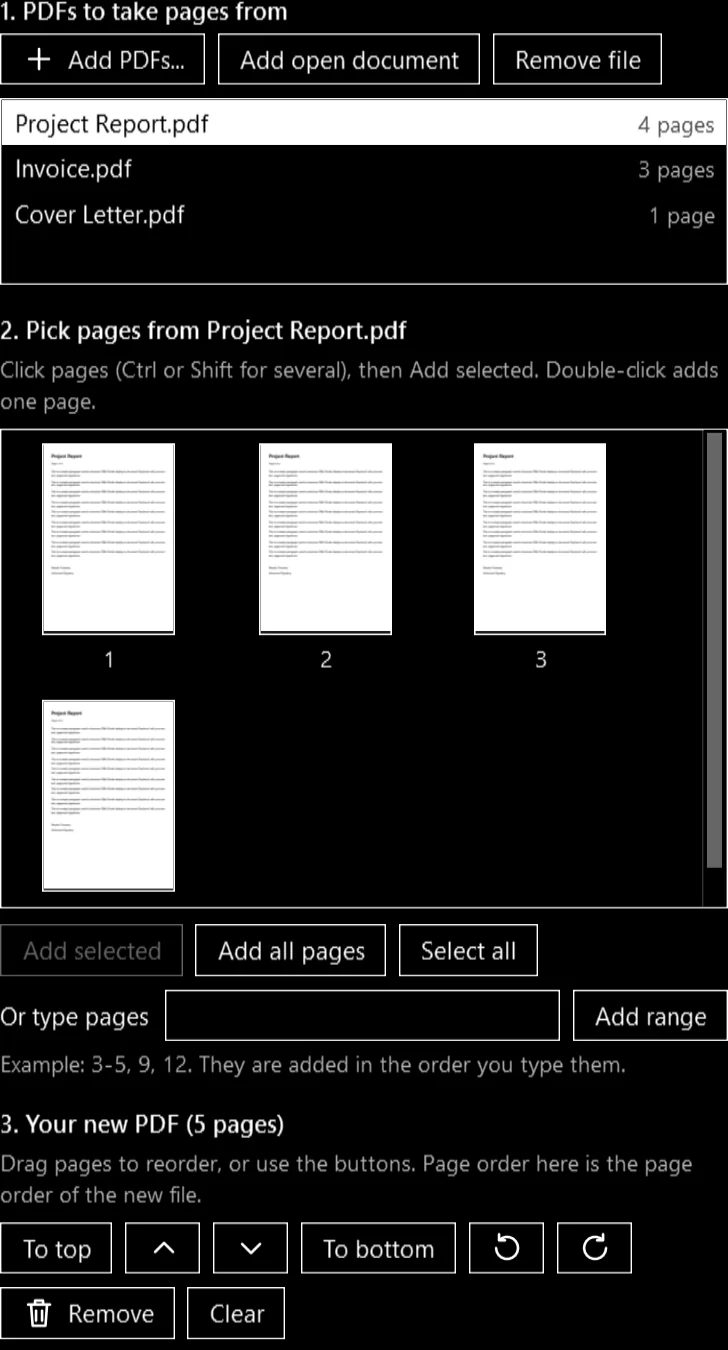
Frequently Asked Questions
Quick answers on safety, signing and versions.
Built by vistaar.space · Not affiliated with Adobe
More free tools from TRUEवित्त.SPACE
Other tools you may find useful.